- Python
- Flask
- SQLAlchemy
- Docker
- SQLite
Smart AI Ticket Management System
An enterprise-grade IT helpdesk system featuring zero-auth token tracking, dual-stage Gemini AI triage, dynamic QA health checklists, and 3-way closed-loop verification.
When an employee suffers a critical IT lockout—their enterprise SSO credentials expire, a motherboard fails, or departmental network access drops—the last thing they need is fighting an authentication wall.
Nonetheless, traditional enterprise helpdesks (like Jira or ServiceNow) routinely introduce friction at the point of need:
- The Authentication Paradox: When users are locked out of their enterprise SSO or Active Directory accounts, they cannot log in to submit a ticket stating that they cannot log in.
- Triage Inaccuracy & Priority Inflation: Distressed users invariably tag every request as “Urgent” or pick incorrect infrastructure categories, creating bottlenecks for service desk dispatchers.
- Premature Ticket Closures: Technicians under pressure to meet Service Level Agreements (SLAs) frequently mark tickets as “Resolved” with terse notes, leaving users stranded and forcing frustrating ticket reopening loops.
- Opaque Communication & Tracking Fatigue: Without transparent visibility into troubleshooting steps, requesters repeatedly call or message technicians for status updates.
We built the Smart AI Ticket Management System to fundamentally rethink IT service desk operations. The system pairs a zero-auth tracking architecture with dual-stage Google Gemini AI triage, context-aware quality assurance checklists, and a three-way closed-loop closure protocol using electronic signatures.
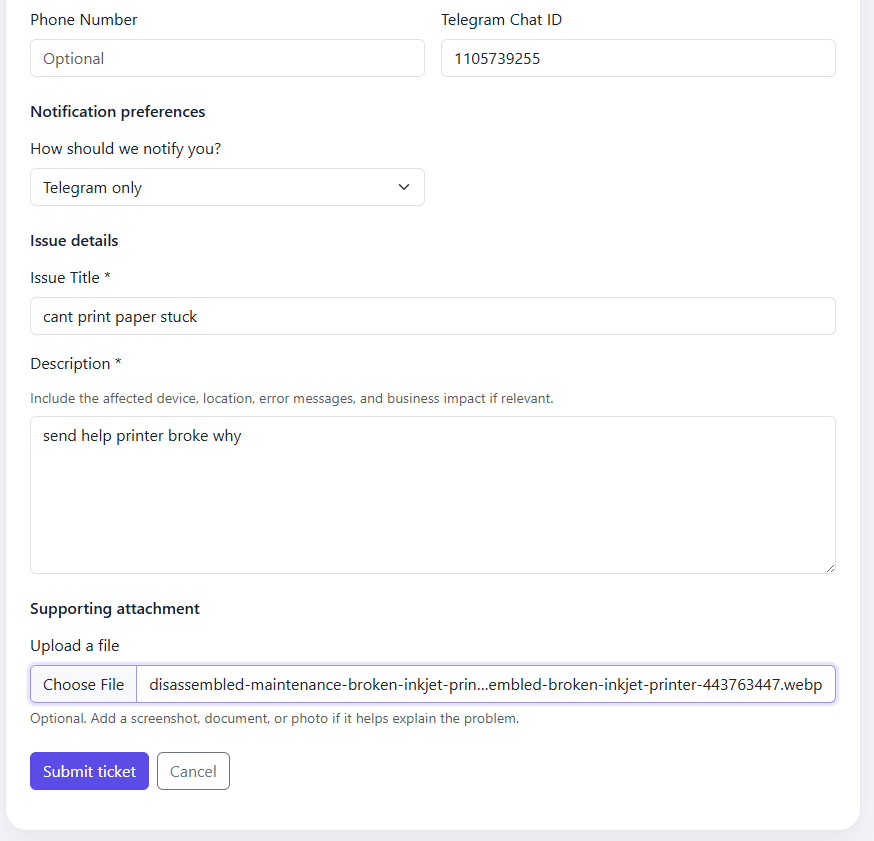 Submission form allowing seamless issue submission without prior login and direct token-based tracking.
High-Level System Architecture
The application is structured as a modular, event-driven Python service built on top of Flask and SQLAlchemy, designed for clean separation between public requester workflows, technician workspaces, administrative governance, and external AI/notification integrations.
flowchart TD
    subgraph Clients["User Personas"]
        REQ["Requester"]
        TECH["Technician"]
        ADM["Administrator"]
    end

    subgraph AppServer["Application Engine"]
        PUB_R["Public Portal"]
        TECH_R["Technician Desk"]
        ADM_R["Admin Console"]

        subgraph Services["Domain Services"]
            TRIAGE["Gemini Triage"]
            VERIFY["Verification Gate"]
            ROUTER["Skill Dispatcher"]
            NOTIFY["Notification Service"]
        end
    end

    subgraph Storage["Persistence & Files"]
        DB[("Relational Database")]
        FS["Proof Attachments"]
        SIG["Signature Vault"]
    end

    subgraph External["External Integrations"]
        GEMINI["Gemini Flash API"]
        SMTP_SRV["SMTP Gateway"]
        TG_API["Telegram Bot API"]
    end

    REQ --> PUB_R
    PUB_R --> TRIAGE
    TRIAGE <--> GEMINI
    PUB_R --> ROUTER
    ROUTER --> DB
    PUB_R --> DB
    PUB_R --> NOTIFY

    NOTIFY --> SMTP_SRV
    NOTIFY --> TG_API

    TECH --> TECH_R
    TECH_R --> VERIFY
    TECH_R --> FS

    REQ --> SIG
    VERIFY --> DB

    ADM --> ADM_R
    ADM_R --> DB
Core System Layers
- Zero-Auth Requester Tracking Layer: Allows users to submit incident reports and attachments without creating credentials. Access to the ticket is secured via cryptographically generated URL-safe tokens (
/t/<token>). - AI Triage & QA System: Integrates AI models to automatically classify incidents, prioritize impact against standard business rules, recommend specialized technician categories (e.g. for printers, laptops, networking, etc.), and provide troubleshooting health checklists.
- Technician Operations Workspace: A responsive split-pane interface with mobile support, technicians can filter assigned workloads, communicate via separate public updates and internal staff notes, and record test runs.
- Three-Way Closure Verification Engine: Enforces a strict state machine preventing tickets from being closed until three criteria are fulfilled: verified proof-of-fix artifacts, technician QA checklist passage, and requester electronic signature confirmation.
- Dual-Channel Notification: Dispatches lifecycle updates via corporate SMTP (TLS/SSL) and Telegram Bot webhooks, tailored to individual user notification preferences (
BOTH,EMAIL,TELEGRAM,NONE). - Admin Governance & Observability: Provides real-time SLA metrics (such as stale ticket detection), technician workload distribution, and a supervisor audit log.
The Zero-Auth Dilemma & Cryptographic Token Tracking
When designing enterprise tools, developers often default to placing every route behind corporate Single Sign-On (SSO). However, in IT helpdesk environments, this creates a major usability roadblock:
flowchart TD
    A["SSO Credential Expires"]
    B["Open Support Portal"]
    C["Redirect to SSO (Access Denied)"]
    D["Offline Bottleneck (Phone / Desk)"]

    A --> B
    B --> C
    C --> D
To resolve this without opening the system to public tampering, we engineered a Zero-Auth Token Tracking model:
sequenceDiagram
    autonumber
    actor Requester
    participant App as Flask Engine
    participant DB as SQLite Database
    participant Client as Local Storage

    Requester->>App: POST /submit
    Note over App: Mint 128-bit URL token
    App->>DB: Persist Ticket & Token
    App-->>Requester: 302 Redirect to /submitted/token
    App->>Client: Cache token in localStorage
    Requester->>App: GET /t/token
    Note over App: Validate token entropy
    App-->>Requester: Render Ticket & E-Sign Pad
Cryptographic URL Implementation
When an incident is submitted, the secrets module generates a 128-bit URL-safe token. With over $2^128$ possible combinations, brute-force enumeration across the tracking endpoint /t/<token> is computationally infeasible:
# routes_public.py
token = secrets.token_urlsafe(16)

ticket = Ticket(
    tracking_token=token,
    requester_id=requester_row.id,
    issue_title=issue_title,
    description=description,
    assigned_technician_id=tech.id if tech else None,
    ai_summary=triage.get("summary"),
    ai_solution_suggestion=triage.get("solution"),
    ai_suggested_skill_group=skill_group,
    ai_model=triage.get("_model"),
    ai_raw_json=triage.get("_raw"),
    health_questions_json=health_questions_json,
    updated_at=now_utc(),
)
set_ticket_lookups(ticket, db, category=category, priority=priority, status="NEW")
db.add(ticket)
To maintain user convenience, the client-side tracking interface records submitted tokens into the browser’s localStorage. Requesters can revisit recent tickets on their machine with a single click without ever creating an account.
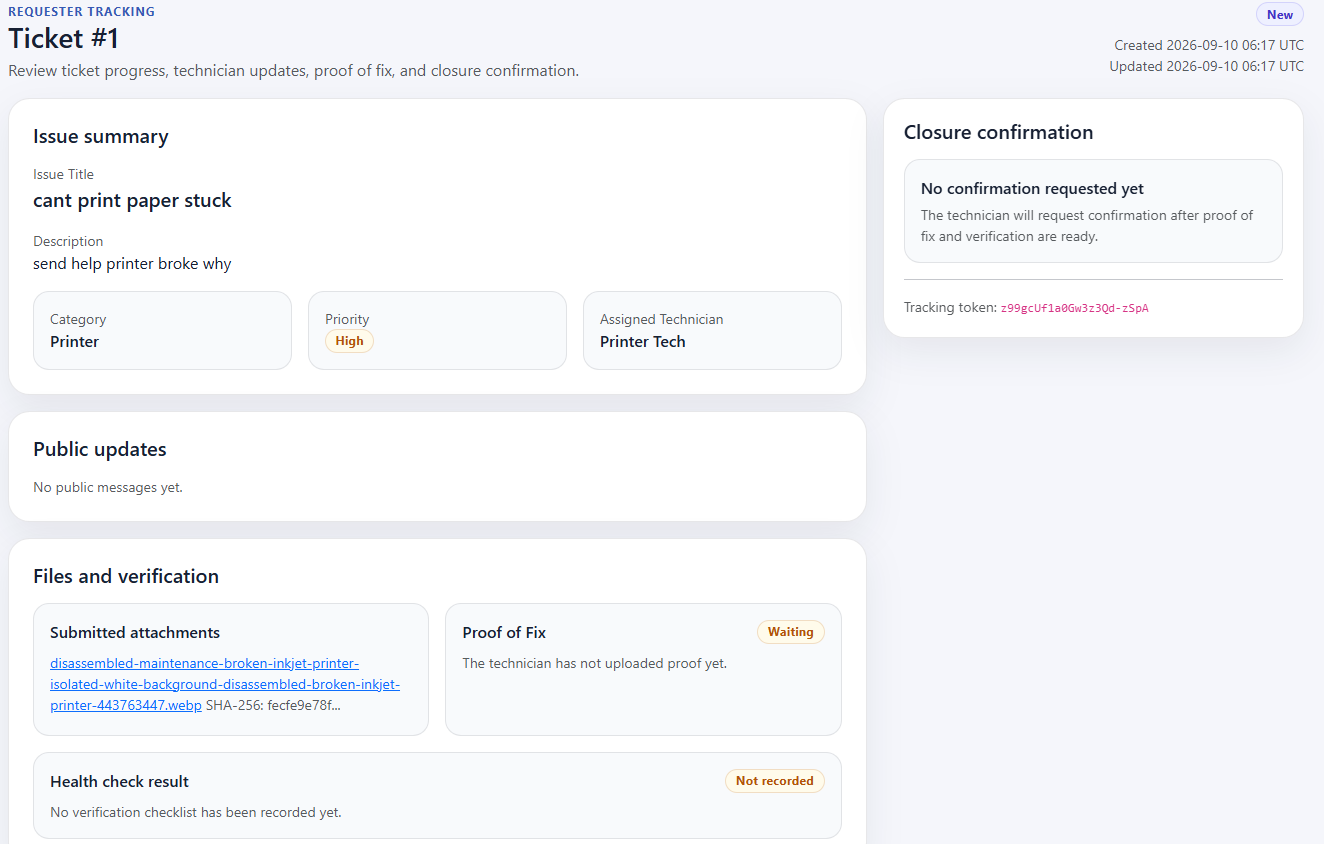 The requester tracking interface: displaying real-time ticket properties, public dialogue, and attached evidence.
Dual-Stage Gemini AI Integration
Most LLM integrations in helpdesks stop at basic chatbots that provide generic advice. In this system, generative AI acts as a deterministic data pipeline and quality gatekeeper operating across two discrete stages:
flowchart LR
    subgraph Stage1["Stage 1: Ingestion Triage"]
        RAW["Raw Ticket"] --> PROMPT1["Triage Prompt"]
        PROMPT1 --> GEMINI1["Gemini Flash"]
        GEMINI1 --> VALIDATE1["Schema Normalizer"]
        VALIDATE1 --> TRIAGE_OUT["Triage Metadata"]
    end

    subgraph Stage2["Stage 2: QA Generation"]
        TRIAGE_OUT --> PROMPT2["Contextual Prompt"]
        PROMPT2 --> GEMINI2["Gemini Flash"]
        GEMINI2 --> SANITIZE2["Fallback Reconciler"]
        SANITIZE2 --> QA_OUT["5-Question Checklist"]
    end
Stage 1: Ingestion Triage & Business-Rule Prioritization
Free-form text submissions from non-technical users are often unstructured. An employee might write: “My screen is completely black and making a clicking noise, I have an executive presentation in 20 minutes.”
Rather than relying on the user to accurately self-diagnose, the ingestion pipeline dispatches the raw text to Gemini 2.5 Flash using strict JSON output mode (response_mime_type: "application/json"). Importantly, the model is constrained by hardcoded business impact definitions:
# ai_triage.py
def _build_prompt(issue_title: str, description: str) -> str:
    return f"""
You are an IT helpdesk triage assistant.

Read the ticket title and description and perform the classification directly.
Return strict JSON only. Do not explain yourself. Do not return markdown.

Return exactly this JSON object:
{{
  "summary": "...",
  "category": "...",
  "priority": "...",
  "suggested_technician_skill_group": "...",
  "solution_suggestion": "..."
}}

Rules:
- category must be exactly one of: Network, Printer, Account, Hardware, Software
- priority must be exactly one of: Low, Medium, High, Critical
- choose priority using these business rules, not general judgment:
  Low = minor issue, little impact, workaround exists
  Medium = normal support issue, affects one user or limited work
  High = serious issue, important work blocked, no easy workaround
  Critical = major outage, many users affected, core business operation disrupted
- suggested_technician_skill_group must be exactly one of: Network, Printer, Account, Hardware, Software, General
- summary must be concise and based only on the ticket title and description
- solution_suggestion must be a concise actionable suggestion based only on the ticket title and description

Ticket title: {issue_title}
Ticket description: {description}
""".strip()
Sanitization & Graceful Fallback Architecture
LLMs can occasionally include extraneous markdown wrappers or introductory conversational phrases (e.g., “User reported: …”). The triage module runs all model output through a strict validator and regex sanitizer:
def _sanitize_summary(text: str, fallback: str) -> str:
    value = (text or "").strip()
    if not value:
        return fallback
    # Strip conversational LLM framing
    value = re.sub(
        r"^(requester reported|user reported|customer reported|reported issue|issue summary|summary|issue)\s*:\s*",
        "",
        value,
        flags=re.IGNORECASE,
    ).strip()
    return value or fallback
If the Gemini API encounters network timeouts, invalid JSON, or quota exhaustion, the pipeline will not crash the user’s submission. Instead, it triggers _fallback_triage(), assigning default classifications (Software / Medium / General) and flagging the incident for manual review.
Stage 2: Context-Aware QA Health Checklists
One of the most persistent failure modes in IT operations is incomplete repairs: a technician fixes the immediate symptom (e.g., clearing a jammed paper feed) but forgets to verify related components (such as resetting print spoolers or checking toner alerts), leading to repeat tickets within hours.
Generic checklists fail because an account lockout requires vastly different verification steps than a severed VLAN connection or a failing SSD.
To solve this, our system generates a tailored, 5-question quality assurance checklist specific to each ticket’s symptoms upon creation:
# health_check.py
def _health_questions_ai(issue_title: str, description: str, category: str, max_questions: int) -> list[str] | None:
    prompt = f"""
You are an IT helpdesk quality-assurance assistant.
Return ONLY valid JSON (no markdown) with EXACT key: questions

Rules:
- questions must be concise, actionable checks for a technician who just fixed the issue
- avoid asking for credentials or personal data
- tailor to the specific issue details; avoid generic category-only questions
- include at least 2 questions that reference the reported issue or reproduction steps
- provide exactly {max_questions} questions

Category: {category}
Title: {issue_title}
Description: {description}
""".strip()
    # Execute Gemini API call with structured schema...
For instance, if a ticket reports “Cannot print confidential payroll reports on 3rd-floor laser printer,” Gemini generates targeted operational checks:
- Did you clear the physical paper path and inspect the pickup rollers?
- Can the printer successfully output an internal test page without error codes?
- Is the print queue cleared of stuck spool jobs on the print server?
- Can the requester send a sample print job from their specific workstation?
- Did you verify that secure printing permissions remain restricted to payroll personnel?
If the AI service is unreachable, the system automatically pulls from a verified offline dictionary (HEALTH_CHECK_FALLBACK) mapped to the incident category, ensuring standard operating procedures (SOPs) are consistently enforced.
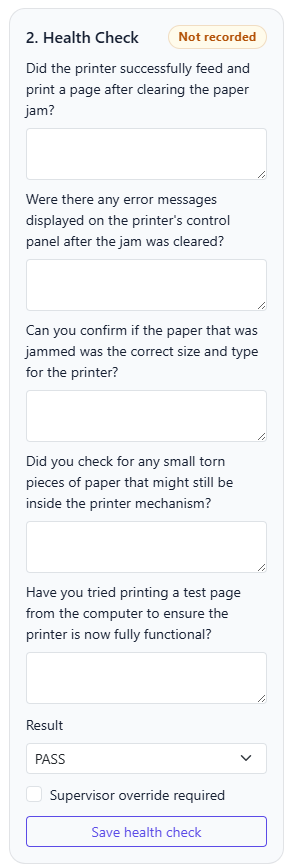 The technician workspace: displaying the AI-generated issue summary, recommended resolution steps, and custom verification questions.
Automated Skill-Based Technician Dispatch
Once the AI triage pipeline determines the optimal technician category, tickets are routed automatically without human dispatcher overhead.
The routing engine evaluates the database for active technicians belonging to the matching skill group whose status is set to Available:
# tickets.py
def pick_technician(db, skill_group: str) -> Technician | None:
    q = db.query(Technician).filter(Technician.is_active == True)
    # 1. Match active technician in the specific skill group who is not 'Off'
    tech = (
        q.filter(Technician.skill_group == skill_group)
        .filter(Technician.availability != "Off")
        .order_by(Technician.id.asc())
        .first()
    )
    if tech:
        return tech
    # 2. Fallback: Assign to any available technician across the pool
    return q.filter(Technician.availability != "Off").order_by(Technician.id.asc()).first()
If all specialized network technicians are marked Off or unavailable, the system cascades gracefully to the general technician pool, ensuring no ticket languishes in an unassigned state.
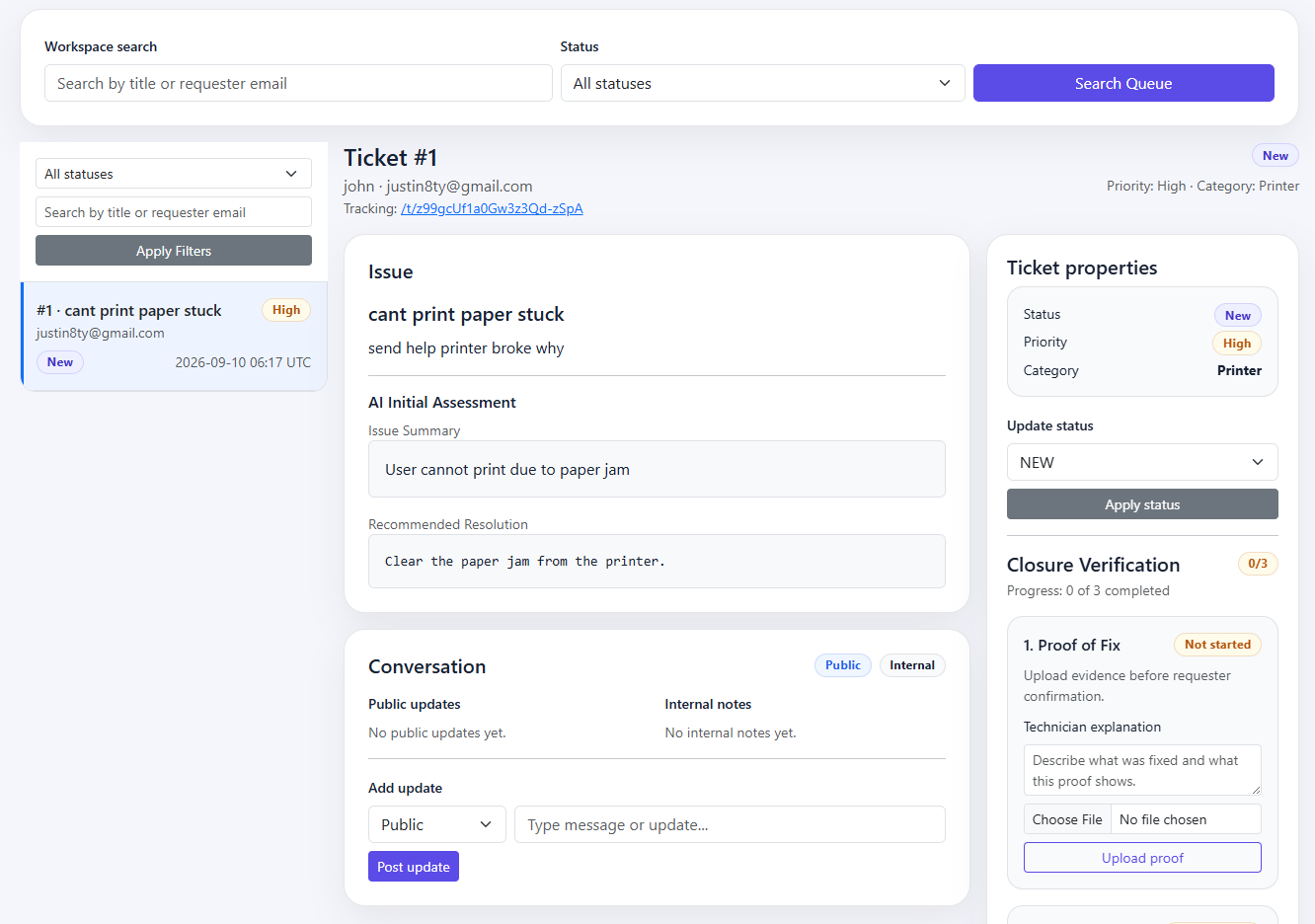 Technician operations workspace with automatic skill-based routing and SLA urgency indicators.
The Three-Way Closed-Loop Verification Protocol
In standard ticketing software, a technician can simply select "Status: Closed" and move on. In this system, closing a ticket is governed by this state machine:
stateDiagram-v2
    [*] --> NEW
    NEW --> IN_PROGRESS: Technician Claim

    state IN_PROGRESS {
        [*] --> WorkStarted
        WorkStarted --> UploadProof: Upload Artifact
        UploadProof --> RunHealthCheck: Run QA
        RunHealthCheck --> ChecklistPassed: Result == PASS
        RunHealthCheck --> ChecklistFailed: Result == FAIL
    }

    ChecklistPassed --> PENDING_CONFIRMATION: Request Signoff

    state PENDING_CONFIRMATION {
        [*] --> AwaitingRequester
        AwaitingRequester --> RequesterSigns: Approved
        AwaitingRequester --> RequesterRejects: Unresolved
    }

    RequesterSigns --> CLOSED: 3 Criteria Verified
    RequesterRejects --> REOPENED: Reset State
    REOPENED --> IN_PROGRESS

    IN_PROGRESS --> CLOSED: Supervisor Override
    PENDING_CONFIRMATION --> CLOSED: Supervisor Override
Ticket Closure Logic
Before any transition to CLOSED is committed to the database, the system evaluates the state of the ticket’s related relational tables:
# tickets.py
def ticket_has_proof(ticket: Ticket) -> bool:
    return any(a.attachment_type == "Proof-of-Fix" for a in ticket.attachments)

def is_requester_confirmed(ticket: Ticket) -> bool:
    cc = ticket.closure_confirmation
    return bool(cc and cc.status == "CONFIRMED")

def can_close_ticket(ticket: Ticket) -> bool:
    # 1. At least one file marked as Proof-of-Fix must exist
    if not ticket_has_proof(ticket):
        return False
    # 2. The requester must have electronically confirmed resolution
    if not is_requester_confirmed(ticket):
        return False
    # 3. If an administrative supervisor override is active, bypass health check
    if ticket.closure_override:
        return True
    # 4. Otherwise, the latest health check must explicitly be PASS
    hc = latest_health_check(ticket)
    return bool(hc and hc.result == "PASS")
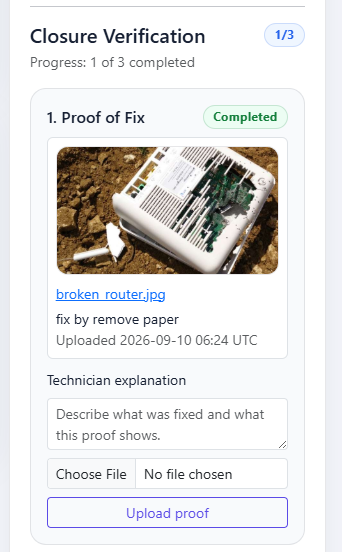
If a technician attempts to close a ticket before the requester has signed, the system intercepts the request and automatically sets the status to PENDING_CONFIRMATION instead, triggering a notification to the requester.
 Ticket closure state machine enforcing proof artifacts, health checks, and requester signatures before resolution.
Verification Pillars Breakdown
1. Proof-of-Fix Artifacts with SHA-256 Hashing
Technicians cannot claim resolution through words alone. They must upload tangible proof (e.g., terminal output showing ping success, driver installation receipt, or screenshot of resolved application errors).
Each file is saved with timestamped naming and immediately hashed using SHA-256 to ensure forensic auditability:
# attachments.py
dest = ticket_dir / f"{int(time.time())}_{filename}"
file.save(dest)
digest = sha256_file(dest)

attachment = Attachment(
    ticket_id=ticket_id,
    attachment_name=filename,
    attachment_path=str(dest),
    attachment_hash=digest,
    attachment_type="Proof-of-Fix",
    uploaded_by_technician_id=uploaded_by_id,
    attachment_description=description,
)
2. Health Check Execution with Conditional Failure Branches
When filling out the dynamic QA checklist, technicians must record either PASS or FAIL. If a check fails, the interface conditionally enforces two mandatory text fields:
- Failure reason: What specific test failed?
- Next action required: What subsequent hardware replacement or vendor escalation is required?
3. HTML5 Pointer-Events Canvas E-Signature & Rejection Workflow
When a ticket enters PENDING_CONFIRMATION, the requester tracking interface unlocks an electronic signature pad.
Built using the HTML5 Canvas API and PointerEvents (providing cross-device compatibility across mice, touchscreens, and styluses), requesters draw their physical signature to confirm that the service restoration is satisfactory:
// track.html signature pad handling
function startDraw(event) {
  isDrawing = true;
  hasDrawing = true;
  const point = getPoint(event);
  ctx.beginPath();
  ctx.moveTo(point.x, point.y);
  ctx.lineTo(point.x, point.y);
  ctx.stroke();
  signaturePad.setPointerCapture(event.pointerId);
}
When submitted, the base64-encoded canvas data is decoded on the server, cryptographically hashed with the application secret key to prevent forgery, and stored as an immutable PNG:
# utils.py
digest = hashlib.sha256(raw + str(ticket_id).encode("utf-8") + SECRET_KEY.encode("utf-8")).hexdigest()
filename = f"sig_{ticket_id}_{int(time.time())}_{digest[:10]}.png"
path = SIGNATURE_DIR / filename
path.write_bytes(raw)
Conversely, if the technician’s fix did not solve the issue, the requester clicks “Report issue still unresolved”, providing a mandatory explanation. The ticket immediately rolls back to REOPENED, posts a public notification message, and alerts the technician to resume investigation.
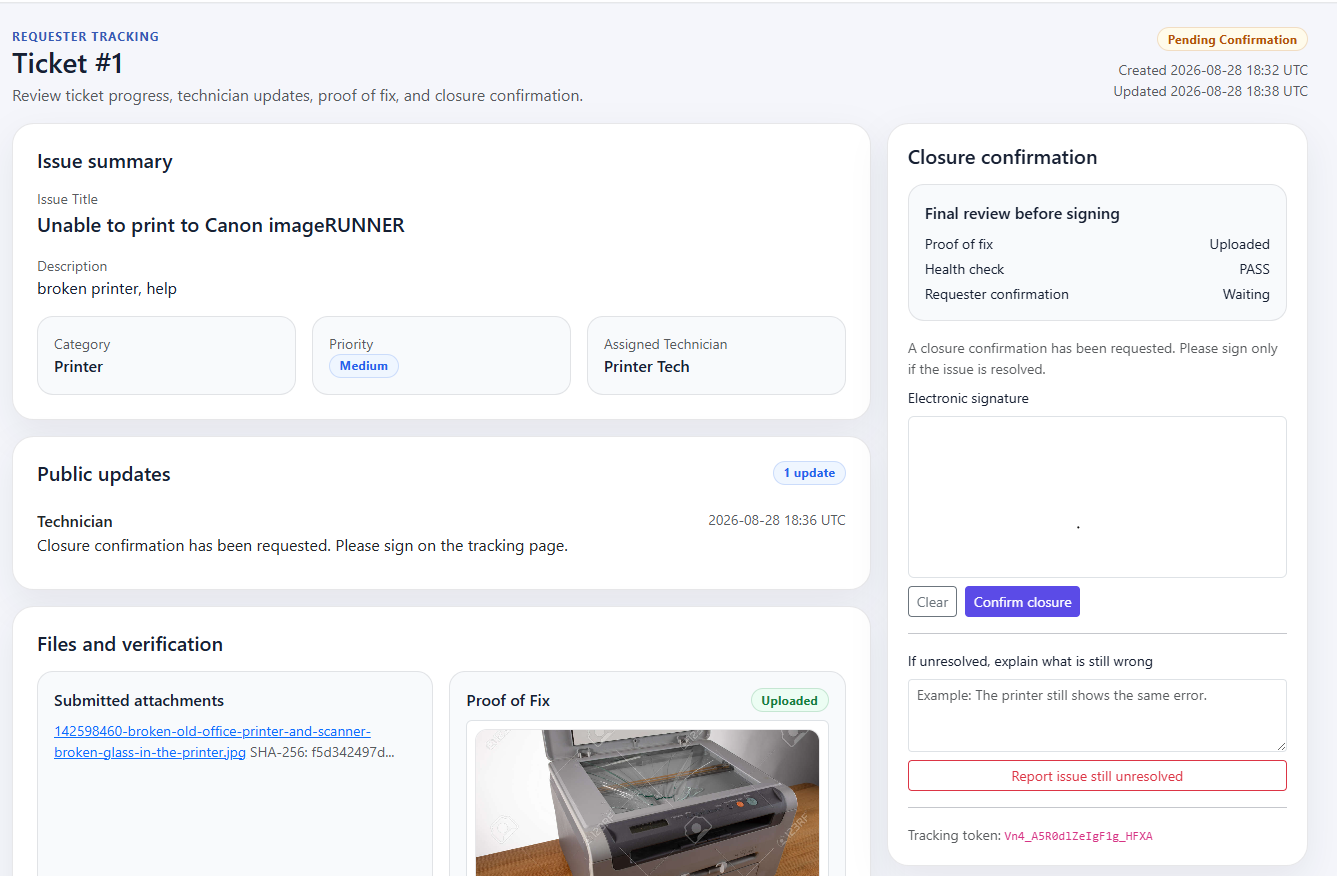 The requester verification card: requiring review of uploaded proof-of-fix images before drawing an electronic signature.
4. Break-Glass Supervisor Administrative Override
Real-world IT support faces edge cases: an employee files a ticket, goes on extended medical leave or vacation, and is unreachable to sign the confirmation.
To prevent tickets from stalling indefinitely, an Admin can invoke a Supervisor Override. This requires submitting an explicit audit reason, which is permanently logged into admin_action_log alongside the supervisor’s admin ID and timestamp.
Dual-Channel Notification Engine: SMTP & Telegram
Effective IT operations require timely status synchronization across multiple stakeholders. The system incorporates an event-driven notification engine supporting both corporate email and Telegram messaging:
flowchart TD
    EVT["Lifecycle Event"] --> ROUTE["Event Router"]
    ROUTE --> PREF{"User Preference?"}

    PREF -->|Email| SMTP["SMTP Gateway"]
    PREF -->|Telegram| TG["Telegram Client"]
    PREF -->|Both| SMTP
    PREF -->|Both| TG

    SMTP --> REQ_INBOX["Requester / Tech Email Inbox"]
    TG --> REQ_TG["Requester / Tech Telegram App"]
The service normalizes preferences and formats messages with deep-linked tracking URLs:
# notification_service.py
REQUESTER_EVENT_TITLES = {
"ticket_created": "Ticket Submitted",
"public_reply": "New Ticket Update",
"closure_confirmation_requested": "Closure Confirmation Required",
"ticket_closed": "Ticket Closed",
"ticket_reopened": "Ticket Reopened / Follow-up Required",
}
def notify_requester(ticket, event_type: str, message: str, base_url: str = "") -> None:
pref = ticket.requester_notification_preference or "BOTH"
tracking_url = f"{base_url.rstrip('/')}/t/{ticket.tracking_token}"
body = f"Ticket #{ticket.id}: {ticket.issue_title}\n\n{message}\n\nTrack progress here: {tracking_url}"
if _channel_allowed(pref, "EMAIL") and ticket.requester_email:
send_email_notification(ticket.requester_email, f"[{REQUESTER_EVENT_TITLES[event_type]}] Ticket #{ticket.id}", body)
if _channel_allowed(pref, "TELEGRAM") and ticket.requester_telegram_chat_id:
send_telegram_notification(ticket.requester_telegram_chat_id, f"*{REQUESTER_EVENT_TITLES[event_type]}*\nTicket #{ticket.id}\n\n{message}\n\n[Open Ticket]({tracking_url})")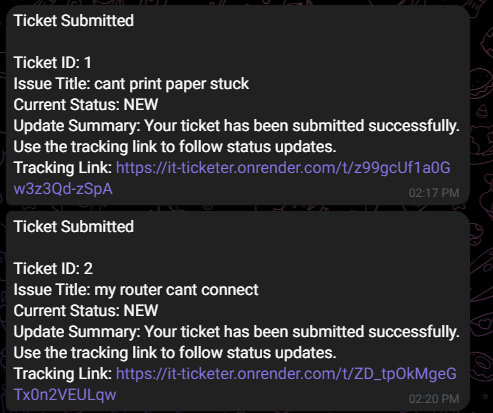 Telegram bot alerts delivering deep-linked token tracking URLs on ticket state changes.
Operational Governance & Observability
For IT management, operational metrics and auditability are critical. The Admin Console provides high-density visibility into helpdesk health and technician workloads:
- SLA & Stale Ticket Detection: Automatically highlights open tickets that have not received an update in more than 3 days (
updated_at < now_utc() - timedelta(days=3)). - Backlog Distribution: Computes dynamic breakdowns by lifecycle status, business priority, and incident category using Python’s
Counter. - Technician Capacity Tracking: Displays real-time allocation across technicians, highlighting which personnel are currently
Available,Busy, orOff. - Immutable Action Audit Logging: Every ticket property modification, technician status toggle, and closure override writes an entry to
admin_action_log, recording the exact previous state, updated state, responsible administrator, and timestamp.
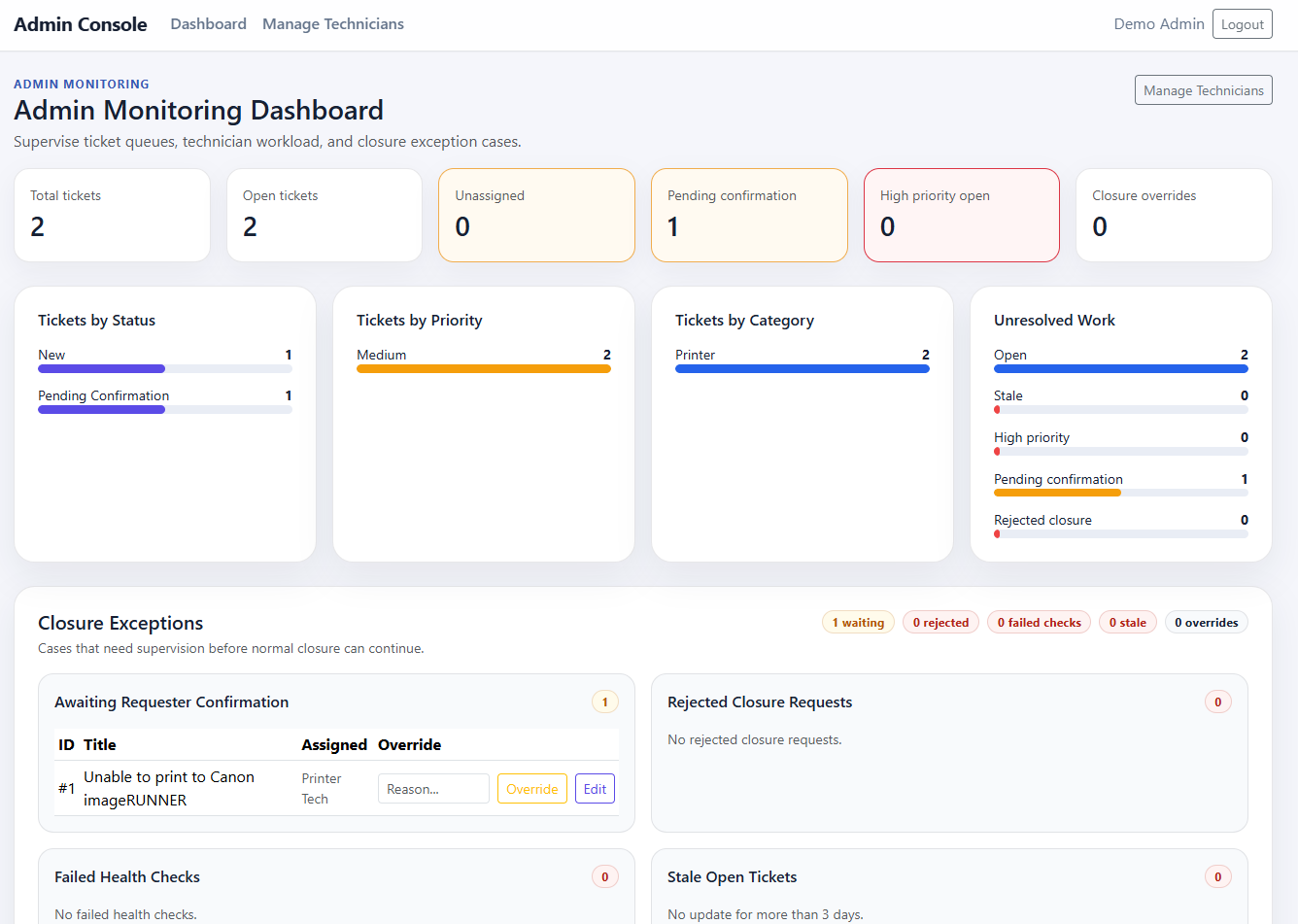
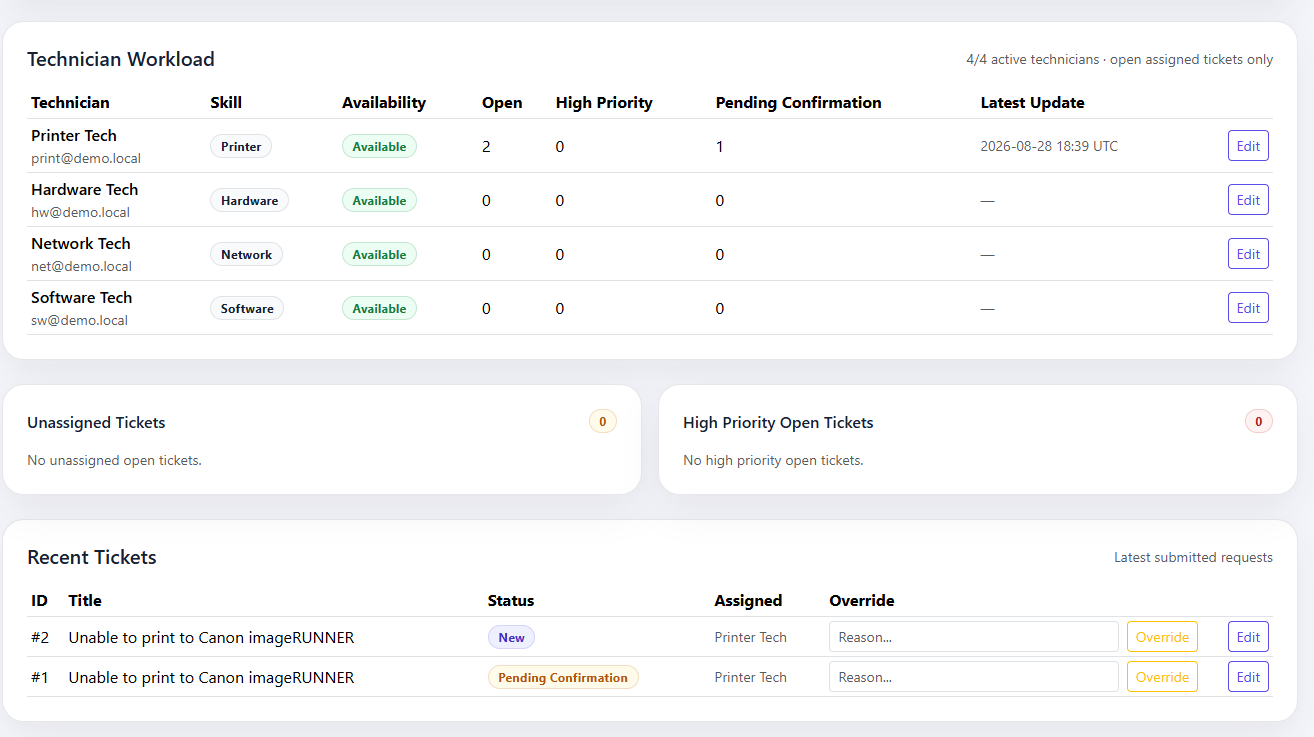 The administrator dashboard: presenting queue volume, SLA alerts for stale tickets, priority distribution, and system logs.
Deployment & Containerization
The system is designed for lightweight, containerized execution as a Docker container with Flask, Gunicorn, and SQLite in a self-contained environment.
# docker-compose.yml excerpt
services:
  web:
    build:
      context: ./web
      dockerfile: Dockerfile
    ports:
      - "8080:8080"
    environment:
      - DB_ENGINE=sqlite
      - SQLITE_PATH=/app/data/ticketdb.sqlite3
      - GEMINI_MODEL=gemini-2.5-flash
      - HEALTH_AI_ENABLED=true
    volumes:
      - ticket_data:/app/data
      - ticket_uploads:/app/uploads
Key Engineering Takeaways
Building the Smart AI Ticket Management System yielded several core software architecture lessons:
- AI as Deterministic Quality Control: In operational enterprise software, generative AI delivers maximum value when bound to strict JSON schemas, conservative temperatures (
0.2), and deterministic regex sanitizers. Using LLMs to categorize incidents and synthesize custom QA checklists solves IT operational friction. - Zero-Auth Doesn’t Mean Zero-Security: Generating 128-bit cryptographic tokens via
secrets.token_urlsafeeliminates login friction for locked-out employees while maintaining strong isolation. - Enforce Closing Gates in the Data Layer: If a system allows technicians to click “Close” without automated validation, tickets will inevitably be closed prematurely. Encoding proof-of-fix uploads, health checklist validation, and requester e-signature confirmation directly into the state machine enforces organizational quality by design.
- Resilient Multichannel Fallbacks: External APIs (whether LLMs, SMTP relays, or messaging bots) will fail sometimes. Designing local fallbacks like static QA question banks and graceful triage defaults ensures that the core helpdesk operations never grind to a halt.